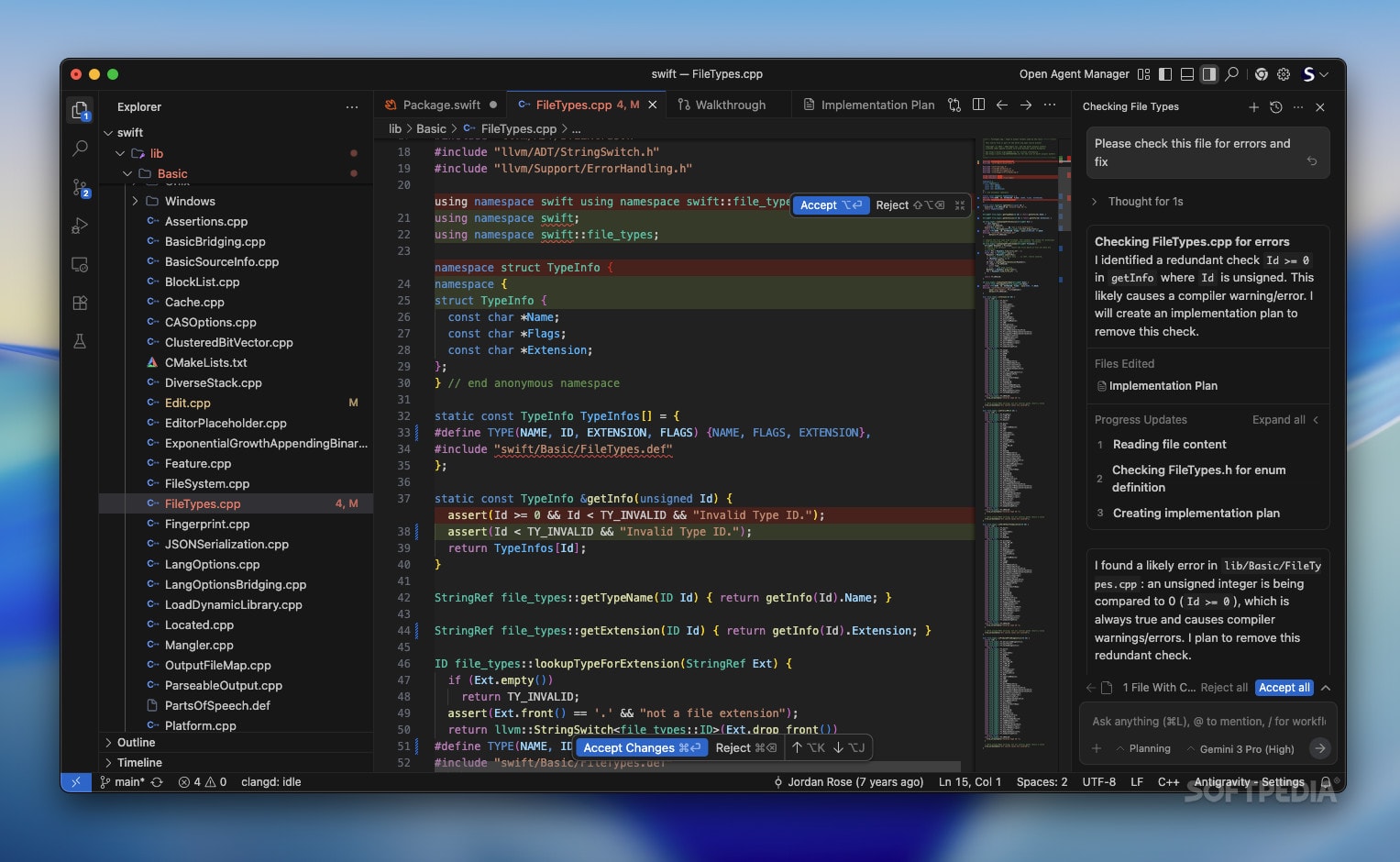
Google Antigravity is an IDE. Software development has historically been a battle against gravity. In this context, “gravity” is the accumulated weight of technical debt, boilerplate configuration, syntax errors, and context switching. For decades, the Integrated Development Environment (IDE) has been the ground station-a place where humans manually assemble logic, line by line, fighting the friction of the machine.
Introduction: The Weight of Code in Google Antigravity
We moved from text editors to intelligent code completion (IntelliSense). Then came the era of AI assistants, essentially advanced autocomplete tools that could suggest the next few lines or refactor a function. While helpful, these tools kept the human firmly in the pilot’s seat, requiring constant micromanagement. The cognitive load remained high.
Enter Google Antigravity.
Antigravity represents a paradigm shift from “AI-assisted” to “Agent-first.” It is not just an IDE; it is an orchestration layer where Gemini 3-powered agents act as your engineering team. This chapter explores the foundational philosophy of Antigravity, why it changes the economics of software engineering, and how it differs fundamentally from every tool that came before it.
The Core Philosophy: Inversion of Control
To master Antigravity, you must unlearn the habit of typing code as your primary action. In a traditional IDE, the human types, and the machine compiles. In Antigravity, the human intends, and the machine implements.
This is known as the Inversion of Control for Authorship.
In the Antigravity model, you are no longer the bricklayer; you are the architect. Your primary interface is not the text editor, but the Context Window and the Agent Orchestrator. When you initialize a project in Antigravity, you are not opening a blank file. You are spinning up a dedicated environment where autonomous agents await instructions.
The Three Pillars of Antigravity
- The Architect (You): You define the system boundaries, business logic, and constraints.
- The Agents (Gemini 3 Workers): Autonomous entities that plan, write, test, and debug code.
- The Fabric (The Environment): The runtime where agents execute code to verify their own work before presenting it to you.
Why Gemini 3 Changes the Game
Google Antigravity is built exclusively on the backbone of Gemini 3. Previous generations of Large Language Models (LLMs) lacked the two critical features required for true agentic workflows: reasoning depth and infinite context persistence.
Reasoning Over Retrieval
Old AI tools relied on RAG (Retrieval-Augmented Generation) to fetch snippets of documentation. Gemini 3, embedded within Antigravity, possesses native reasoning capabilities. It doesn’t just look up how to write a Python script; it understands why that script is necessary for your specific architecture. It can simulate the execution path in its “mind” before writing a single character.
The Infinite Context Horizon
In traditional development, context is lost the moment you close a file or switch tabs. Developers spend hours re-reading code to re-establish mental context. Antigravity leverages Gemini 3’s massive context window to hold your entire repository, documentation, dependency trees, and even your slack conversations about feature requirements in active memory simultaneously.
When you ask an Antigravity agent to “refactor the auth flow,” it doesn’t need you to highlight the relevant files. It already “knows” where the auth flow touches the database, the frontend state management, and the API gateway, because the entire project exists within its cognitive horizon.
Anatomy of an Antigravity Session
Let’s break down what actually happens when you launch Google Antigravity. Unlike VS Code or IntelliJ, you are not greeted with a file tree immediately. You are greeted by the Prompt Canvas.
1. The Intent Phase in Google Antigravity
You input a high-level goal.
- Traditional approach: You create a folder structure
mkdir project,npm init,touch index.js. - Antigravity approach: You type, “Create a microservices-based e-commerce backend that handles high-concurrency inventory locking during flash sales.”
2. The Planning Agent
Before code is written, the Planning Agent analyzes your request. It breaks the intent down into technical specifications. It decides:
- Which language is best (e.g., Go or Rust for concurrency).
- Which database structure fits the locking requirement (e.g., Redis for locking, Postgres for persistence).
- The API contract definitions.
It presents this plan to you in the Blueprint View. This is your first interaction point. You review the plan, not the code. You might say, “Swap Redis for Memcached,” and the agent adjusts the entire architectural plan instantly.
3. The Coding Swarm
Once the plan is approved, Antigravity deploys a “swarm” of sub-agents.
- Agent A scaffolds the database migrations.
- Agent B writes the API handlers.
- Agent C generates integration tests based on the initial intent.
These agents work in parallel. In a traditional IDE, this is impossible for a single developer. Antigravity effectively clones your intent across multiple workers.
Keyword Deep Dive: Agentic Workflow
To succeed with Antigravity, you must understand the terminology that defines this new era.
autonomous coding agents These are not chatbots. They are execution loops. An autonomous agent in Antigravity has permission to read files, write files, run terminal commands, and read the output. If an agent writes code that fails to compile, it sees the error, analyzes it, fixes the code, and retries-all without human intervention. This loop is the “Antigravity” effect; the friction of debugging is lifted from the human.
semantic code understanding
Antigravity doesn’t view code as text strings; it views it as a semantic graph. It understands that variable x in File A is related to function y in File B. When you rename a variable, it doesn’t just do a “find and replace”; it semantically updates the logic across the entire codebase to ensure consistency.
verification loops Trust is the currency of AI. Antigravity introduces the concept of Verification Loops. You don’t just get code; you get verified code. The system writes a test, writes the feature, runs the test, and only alerts you if the test passes (or if it hits a roadblock it cannot solve).
Real-World Example: The “Hello World” of Antigravity
Let’s compare a simple task: Creating a React Component that fetches data from an API.
The Legacy Way
- Create
UserCard.tsx. - Import
useEffect,useStatefrom React. - Define the interface for
User. - Write the fetch logic with
try/catch. - Handle loading states.
- Handle error states.
- Write the JSX for rendering.
- Realize you forgot to export the component.
- Go back and fix it.
Total time: 5-10 minutes. Mental effort: Moderate.
The Antigravity Way
You type into the Canvas: “I need a user card component that fetches from /api/users/:id. It needs skeleton loading states and distinct error handling for 404 vs 500 errors. Use Tailwind for styling.”
What happens:
- UI Agent generates the JSX with Tailwind classes, ensuring accessibility standards.
- Logic Agent writes the
useQueryoruseEffecthook, automatically implementing the distinct error handling logic requested. - Test Agent creates a storybook file or a Jest test to verify the loading state and error states render correctly.
- Antigravity presents the rendered component in a preview window alongside the code.
Total time: 30 seconds. Mental effort: Zero (regarding syntax). You focused entirely on the requirements (skeleton loading, error types) rather than the implementation (imports, syntax).
The Economic Implication for Developers
A common fear is that tools like Antigravity replace developers. The reality is that it replaces typing. It shifts the value of a developer from “knowing syntax” to “system thinking.”
In the Antigravity ecosystem, a junior developer is someone who can prompt an agent to write a function. A senior developer is someone who can orchestrate a fleet of agents to build a resilient distributed system. The bottleneck is no longer how fast you can type; it is how clearly you can think.
We are moving from an economy of scarcity (limited developer hours) to an economy of abundance (infinite coding labor). The constraint is now the clarity of the instruction. This makes Prompt Engineering and System Architecture the two most valuable skills in the tech market.
Addressing the Skepticism: “Spaghetti Code”
A valid concern with AI-generated code is quality. “If I don’t write it, is it garbage?”
Google Antigravity addresses this with Style Enforcement Policies. Before a project begins, you feed the system your style guide (or a popular one like Google Style Guide or Airbnb Style Guide). The agents are strictly bound to these constraints.
Furthermore, because Gemini 3 understands the full context, it avoids the “copy-paste” errors of earlier AI. It doesn’t define duplicate utility functions; it reuses existing ones it finds in your utils folder. It keeps the codebase DRY (Don’t Repeat Yourself) more effectively than a human team because it has perfect memory of every line of code in the project.
Conclusion of Chapter 1
Google Antigravity is not an incremental update. It is a divergent branch in the history of computing. By utilizing Gemini 3’s reasoning and context, it lifts the “gravity” of boilerplate and syntax, allowing developers to operate at the level of pure logic and architecture.
In the next chapter, we will leave the philosophy behind and get our hands dirty. We will walk through the Architecture & Setup of your first Antigravity workspace, exploring how to configure the environment, set permissions for your agents, and define the “Rules of Engagement” for your new AI workforce.
Key Takeaways
- Antigravity is Agent-First: You manage agents, not files.
- Inversion of Control: You define intent; Gemini 3 handles implementation.
- Verification: Agents test their own work before showing it to you.
- Context is King: The infinite context window allows for holistic system understanding, preventing fragmentation.
